Outbox
View and manage a list of files you have sent.
Open this screen from "Outbox" in the sidebar.
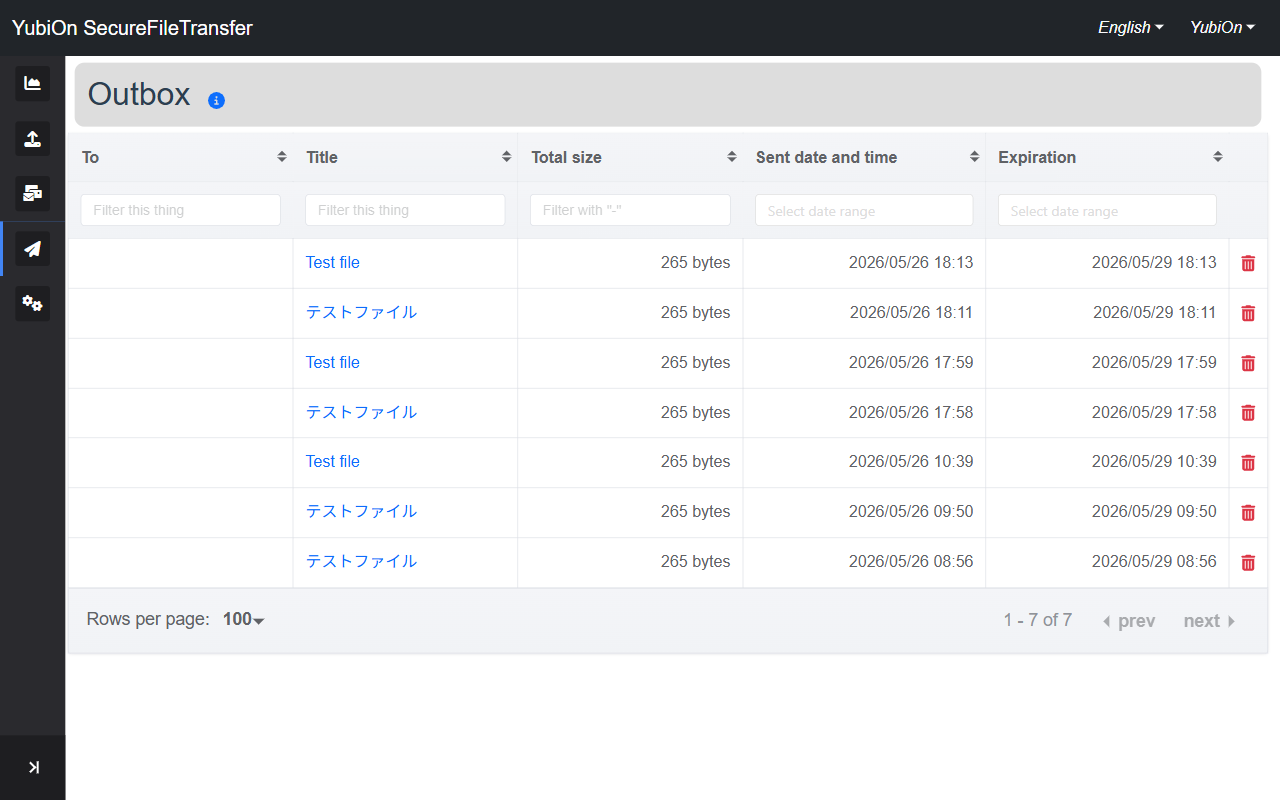
List Columns
| Column | Description |
|---|---|
| To | Email addresses specified as recipients. Left blank if sent as "Unlimited" |
| Title | File set title (click to open the detail screen) |
| Total size | Combined size of all sent files |
| Sent date and time | Date and time the files were uploaded |
| Expiration | Expiration date of the download URL |
| Action | Click the trash icon to delete |
Expired files
Files past their expiration date are displayed in grey.
Filtering
Each column has a filter input field.
| Column | How to filter |
|---|---|
| To | Partial text match |
| Title | Partial text match |
| Total size | Numeric range (e.g. 100-500) |
| Sent date and time | Date range picker |
| Expiration | Date range picker |
Pagination
Pagination is displayed at the bottom of the list. The number of rows per page can be changed and is saved in your browser.
Deleting a File
- Click the trash icon in the row of the file you want to delete
- Click "OK" in the confirmation dialog
- The list refreshes after deletion
WARNING
Deleted files cannot be recovered. Recipients will no longer be able to download them.
Display Range
INFO
On the free plan, only files within their expiration date are displayed.
On paid plans, expired file history is also shown.