Joining an Organization
Steps for joining an organization after receiving an invitation.
Joining via Email
Open the invitation email you received
Click the invitation URL in the email
If not logged in, the login screen appears — log in first
The invitation confirmation screen shows the organization name and the name of the person who invited you
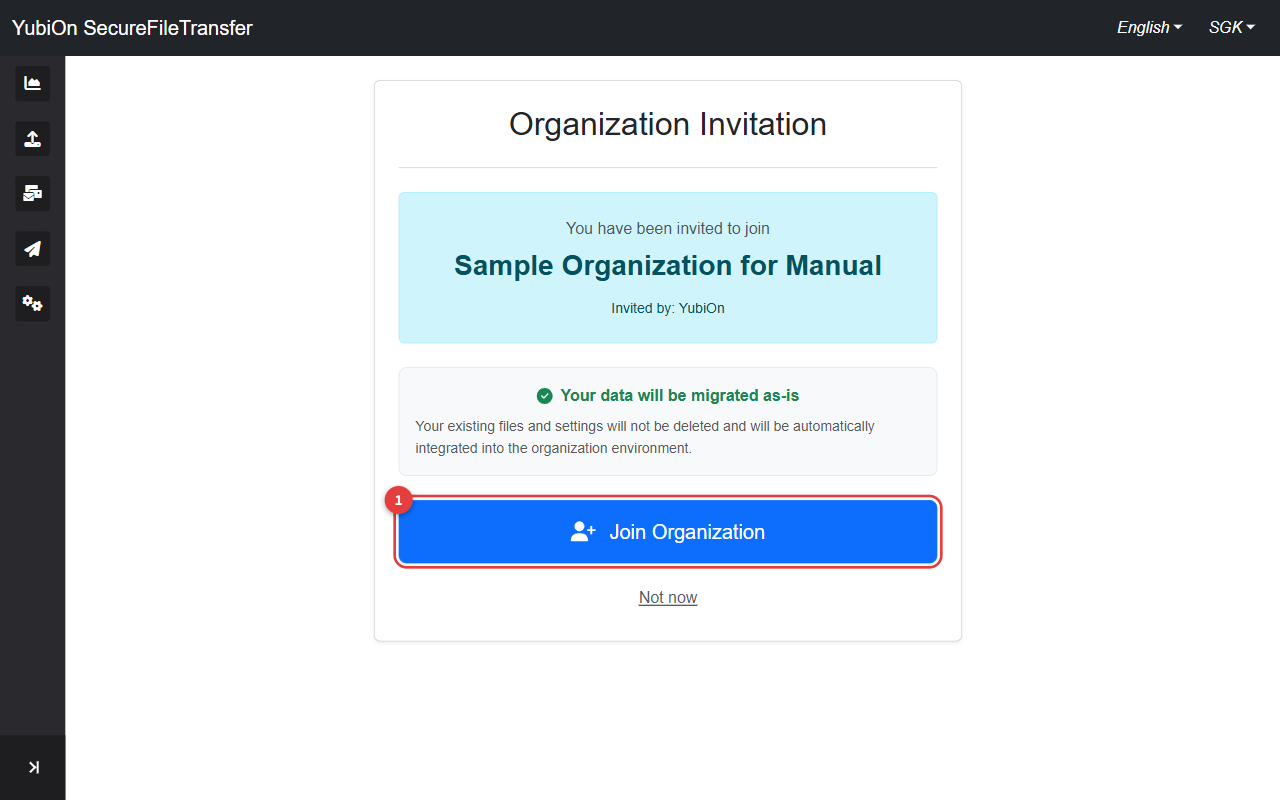
Click the "Join Organization" button
Click "OK" in the confirmation dialog
After joining, you are redirected to the dashboard
Invitation URL Expiry
Invitation URLs have an expiration date. If the link has expired, ask the organization administrator to resend the invitation.
Postponing Your Participation
Click the "Not now" button on the invitation confirmation screen to close the confirmation screen and interrupt the process.
*Note: This action does not cancel the invitation. You can still use the invitation URL to join later.
You will be redirected to the organization creation screen or the login screen.
Creating a New Organization While Invited
If you attempt to create an organization while you have a pending invitation, a notification about the invitation is displayed.
If you proceed and create a new organization, any pending invitations are automatically cancelled.
Error Reference
| Error | Cause | Solution |
|---|---|---|
| The invitation has expired | Invitation URL has expired | Ask the administrator to resend the invitation |
| You are already a member of this organization | Duplicate join attempt | You are already in the organization |
| Invitation not found | Invalid URL | Check that you are using the correct invitation URL |